
 By
By 
Most website hosting plans, including the “unlimited” ones, have a specific Inode limit. Generally, many web hosts provide an Inode limit of 150,000 – 250,000; this is sufficient for smaller websites or newly launched websites.
But when you have multiple websites hosted on your account or one large website that continues to grow, having restricted Inodes can cause issues. So, it is better to choose a hosting plan that offers unlimited or high Inode limits.
In this article, we will discuss the top hosting providers that offer high or unlimited Inodes. But before that, let’s understand what the Inode limit on cPanel is and how it can affect your website.
Contents9
- What Is Inode Limit On cPanel?
- 4 Best Unlimited Inodes Hosting Providers
- Affordable Shared Hosting Plans with High Inodes Limit
- VPS Hosting With High Inodes Limit
- What happens when Inode is full?
- How many Inodes will I need for my website?
- How to Check Inode Usage in Your cPanel Account?
- How do You Reduce Inode Usage?
- Conclusion
What Is Inode Limit On cPanel?
When hosting providers say “unlimited storage”, it does not necessarily imply that you can host unlimited files. Where’s the hidden catch? It’s Inodes.
An inode is a data structure from the Linux file system that allows you to store information – directories, emails, files, and folders. In cPanel, it is referred to as “ File Usage Limit ” or “ Inodes Usage ”. That means the Inodes limit defines the number of files, folders, and emails that you can store in your hosting account.
Every hosting provider offers limited Inodes that you can use to store all information. If your Inode usage exceeds this limit, you will receive a warning and your website’s performance will be affected. There are possibilities of your hosting account getting suspended. Therefore, it is recommended to keep your storage data low or use a hosting that offers unlimited or very high Inodes limits.
Unlimited Inode is where there is no limit on the number of files, folders, or emails you can host. However, unlimited Inode hosting is primarily available for managed or cloud services.
There are a few shared hosting providers that offer unlimited or very high Inode limits that are enough to host large volumes of data.



4 Best Unlimited Inodes Hosting Providers
1. DreamHost (No Inode Limit)

DreamHost is the only shared hosting provider that offers unlimited Inodes. At a starting price as low as $2.59/month, having no Inode limit along with several shared hosting features is one of the best things you can have with Dreamhost.
- Inodes: Unlimited
- Number of sites allowed: The Starter Plan supports 1 website and the Shared Unlimited Plan allows unlimited websites
- Disk Storage: Unlimited
- Bandwidth: Unlimited
- Free Migration: Yes; for WordPress
- Starting Price: $2.59/month
- Money-back Guarantee: 97 days
2. Kinsta (Unlimited Inodes)

Kinsta provides powerful managed WordPress hosting plans at an affordable price. It is one of the best choices for managed hosting. It has over 9 different plans to choose from, with a myriad of features that are suitable for every type of website. Most importantly, it offers an unlimited Inodes limit, allowing you to host any number of files, folders, and emails.
- Inodes: Unlimited
- Number of sites allowed: Starting from 1 WordPress installation and up to 150
- Disk Storage: 10 GB – 250 GB
- Bandwidth: Starting plan supports traffic up to 25,000
- Free Migration: Yes
- Starting Price: $30/month
- Money-back Guarantee: 30 days
3. WP Engine (No Inode Limitation)

WP Engine is another reliable managed WordPress hosting provider that offers unlimited Inodes. They offer generous disk storage, excellent server performance, and no limit on Inodes. However, it is extremely expensive.
- Inodes: Unlimited
- Number of sites allowed: Starting from 1 website
- Disk Storage: Starting from 10 GB
- Bandwidth: Starting plan supports 50 GB bandwidth
- Free Migration: Yes
- Starting Price: $25/month
- Money-back Guarantee: 60 days
4. BlackHost (No Inode Limit)

BlackHOST offers unmetered shared hosting, powered by cPanel. Their hosting plans are priced at a low price and offer many unique features. BlackHost offers ImunifyAV with all its shared hosting plans that ensure a great high-end security for your websites, adding to that a limitless Inode limit that is beyond the industry standards.
- Inodes: 16 Million (with all plans)
- Number of sites allowed: Supports 1 – unlimited websites
- Disk Storage: 10 GB – 50 GB
- Bandwidth: Fair usage (Unmetered)
- Free Migration: 1 website transfer with any plan
- Starting Price: $1.95/month
- Money-back Guarantee: 2 Days
5. WPX Hosting

WPX is one of the best- Managed WordPress hosting providers that offer CDN-powered, LiteSpeed hosting plans. It is most suitable if you want to host 4-5 websites. They are excellent at live chat support, server performance, ease of use, and transparency.
- Inodes: Unlimited
- Number of sites allowed: The starter plan supports 5 websites
- Disk Storage: 10 GB – 40 GB
- Bandwidth: 100 GB to unlimited bandwidth
- Free Migration: Yes; unlimited
- Starting Price: $20.83/month
- Money-back Guarantee: 30 days
Except for DreamHost and Blackhost, all other plans are highly-priced but they offer excellent features like server performance, support, and of course, unlimited Inodes – suitable for larger websites with high traffic.
Affordable Shared Hosting Plans with High Inodes Limit
In this section, we will discuss some of the top hosting providers that offer exceptionally high Inodes limits with shared hosting plans.
1. RackNerd

RackNerd is better known for cheap VPS deals, but its cPanel shared hosting is the interesting part for this list. RackNerd's knowledge base lists no inode limit per cPanel account, so the number of files is not the first wall you hit. Other CloudLinux limits still apply, including 1 GB of physical memory, 200 entry processes, and 80 MB/s of disk I/O per account.
Every plan runs on LiteSpeed Web Server with LSCache and includes free daily JetBackup backups, Softaculous, and free SSL certificates. You can place your account in Los Angeles, New York City, Germany, France, or Singapore.
- Inodes: No limit
- Number of sites allowed: Unlimited domains with every plan
- Disk Storage: 30 GB – 200 GB SSD
- Bandwidth: 2 TB – 5 TB monthly transfer
- Free Migration: Yes
- Starting Price: $5.59/month (month-to-month)
- Money-back Guarantee: None by default; refunds are handled case by case
RackNerd suits accounts that hold a very large number of small files, such as big email archives or sites with thousands of cached pages. With no inode cap, disk space becomes the limit to watch: the entry plan's 30 GB is what you are more likely to run out of first.
2. SiteGround

SiteGround is one of the top-recommended shared hosting providers, excelling in server performance, faster website load times, and excellent customer support. The prices are also competitive. More importantly, they offer a significantly higher Inodes limit, up to 600,000, and at a relatively cheaper price of $14.99/month.
- Inodes: 200,000 (StartUp), 400,000 (GrowBig), and 600,000 (GoGeek)
- Number of sites allowed: Starting from 1 to unlimited website hosting
- Disk Storage: 10 GB – 40 GB
- Bandwidth: 100 GB to Unlimited bandwidth
- Free Migration: Yes
- Starting Price: $4.99/month
- Money-back Guarantee: 30 days
3. Hostinger
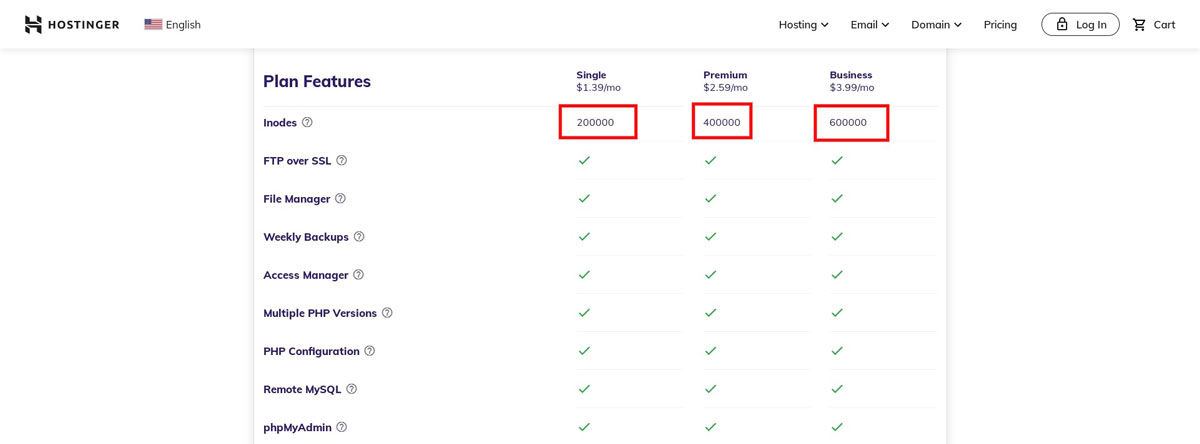
If you are looking for an affordable shared hosting plan that offers high Inodes limit, Hostinger is one of the best options for you. You get features like a free SSL certificate, LiteSpeed Cache with WordPress acceleration, and many more with any web hosting plan you choose. They also offer extremely high Inodes limit with their cloud hosting plans.
- Inodes: 200,000 (Single), 400,000 (Premium), and 600,000 (Business) for shared hosting plans. Cloud hosting plans support Inode count between 2,000,000 and 3,200,000.
- Number of sites allowed: Supports 1 – 100 websites
- Disk Storage: 30 GB – 200 GB
- Bandwidth: 100 GB – Unlimited bandwidth
- Free Migration: Yes
- Starting Price: $1.39/month
- Money-back Guarantee: 30 days
VPS Hosting With High Inodes Limit
A VPS gives you your own file system and root access, so there is no hosting-account inode quota like the one on shared hosting. The practical ceiling is the inode count of the server's disk, which grows with the storage size. These three VPS providers are worth a look:
1. Impreza

Impreza Host shows how much the rules change when you move from shared hosting to a VPS. Its terms cap web hosting accounts at 100,000 files, but they also state that VPS and dedicated servers "are not subject to these shared-resource limits." Impreza does not publish a separate inode number for its VPS, so your limit comes from the file system on your virtual disk.
The KVM VPS plans are available in 10 countries, including Romania, Iceland, the Netherlands, Switzerland, Finland, the USA, and Hong Kong. The entry plan has 1 CPU core, 1 GB of RAM, and 20 GB of SSD storage, which fits smaller sites. A large file collection will need one of the bigger disks.
- Inodes: Not limited by the 100,000-file shared hosting rule (no VPS inode number is published)
- Number of sites allowed: No set limit (depends on server resources)
- Disk Storage: 20 GB – 60 GB SSD
- Bandwidth: 5 TB
- Starting Price: $9/month
2. Hostinger VPS

Hostinger is the clearest option if you want the inode policy in writing. Its plan limits page lists unlimited inodes for all four KVM VPS plans, while its shared plans stop between 200,000 and 600,000.
The plans use KVM virtualization and NVMe storage and include free weekly backups. The entry KVM 1 plan has 1 vCPU, 4 GB of RAM, and 50 GB of NVMe storage. Its starting price requires a 24-month term, and the plan renews at $11.99/month.
- Inodes: Unlimited
- Number of sites allowed: No set limit (depends on server resources)
- Disk Storage: 50 GB – 400 GB NVMe
- Bandwidth: 4 TB – 32 TB
- Starting Price: $6.49/month (24-month term)
- Money-back Guarantee: 30 days
3. InterServer

InterServer sells KVM VPS in "slices," so you can start small and add disk space as your file count grows. One slice costs $3/month and includes 1 CPU core, 2 GB of RAM, 40 GB of SSD storage, and 2 TB of transfer. Every extra slice adds another 40 GB, up to 1,280 GB on a 32-slice server.
InterServer does not publish an inode limit for its VPS. As with other root-access servers, the number of files you can store depends on the disk's file system, which makes storage size the deciding factor. The servers are in New York City, Dallas, and Los Angeles, and managed support is included from 8 slices.
- Inodes: No published limit (set by the VPS file system)
- Number of sites allowed: No set limit (depends on server resources)
- Disk Storage: 40 GB – 1,280 GB SSD (RAID-10)
- Bandwidth: 2 TB – 64 TB monthly transfer
- Starting Price: $3/month
- Money-back Guarantee: None on VPS hosting
These are some of the best hosting providers that offer unlimited or high Inode limit to meet your fast-growing website needs.
In the next section, we will provide information on some of the most commonly asked questions regarding website hosting Inode limit.
What happens when Inode is full?
Your website is continuously executing tasks for serving content to visitors. Many of these tasks include the creation and deletion of files on your server.
When you reach the Inode limit according to your website hosting plan:
- You will be unable to create a new folder or store more files.
- You also won’t be able to receive any new emails.
- Your website performance can be affected, for example (your cache plugin won’t be able to create new caching files).
- The hosting provider also sends a warning message stating that the Inode limit has been reached. If proper measures are not taken, the hosting account will get suspended.
How many Inodes will I need for my website?
The required Inodes count will depend on the type of website you have. For instance, a new WordPress website with limited content and files will need approximately 5,000 Inodes, whereas a more complex and bigger website will need around 25,000 Inodes.
However, as your website grows and you start adding more plugins, files, folders, and emails, the Inode requirement will increase. Generally, this is the standard Inode count most websites need.
How to Check Inode Usage in Your cPanel Account?
The Process to check your Inode usage directly from your cPanel account:
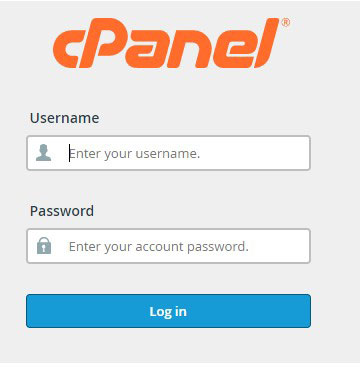
Step 1: Login to your cPanel account.
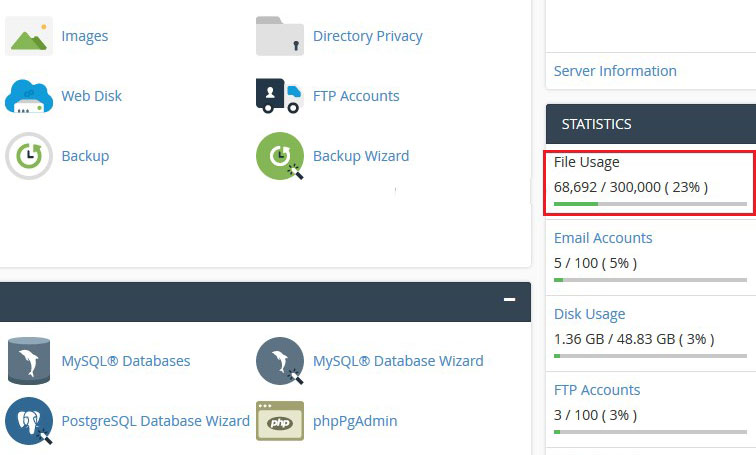
Step 2: On the right side of the account page, you will find the menu “ Statistics ”. Under it, you will find the option “ File Usage ”. You can see the Inode Value or used Inode from here.
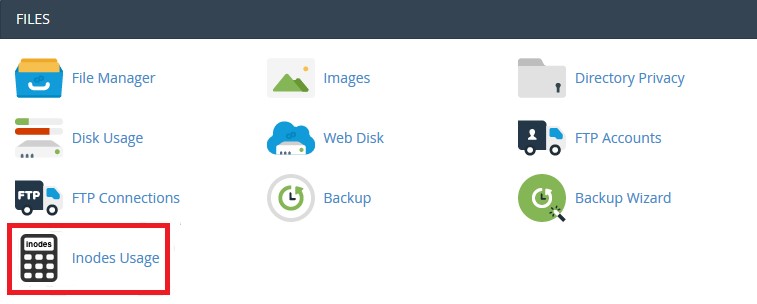
Step 3: If you want to have a detailed view of Inodes usage, navigate to the “ Files ” menu and click the option “ Inode Usage ”.
Step 4: When you click on “ Inode Usage ”, you will find the Top 10 Inode folders and their corresponding Inode count.
How do You Reduce Inode Usage?
Exceeding the Inode usage limit that your hosting plan provides can result in poor website performance or your account can also get suspended. To prevent this, you should take necessary steps like deleting the files and folders you do not require anymore. You can also delete unnecessary emails and remove plugins that you do not use.
If you check your website data, you will also find several empty directories, which you can remove to reduce Inode usage. For data backups, you can create a zip file and store all information in a compressed format. This will further help decrease your Inode usage.
Follow these measures periodically and check Inode usage on a regular basis to ensure uninterrupted website performance & speed, and your account won’t get suspended.
Conclusion
If you want to host multiple websites or have a large web portal that continues to grow, choosing hosting plans that offer unlimited Inodes is important like DreamHost or Kinsta.
Depending on your hosting requirements, you can choose between Managed WordPress, Virtual Private Server, and Shared hosting plans discussed above.
However, not all of them provide unlimited hosting but have the highest Inode limits in the industry today. These are great hosting options and also have attractive prices. If you want to add anything to the information covered in this review, you can mention it in the comments section below.