 By
By 
Looking for a cheap 8-core VPS to run high-intensive apps? It’s a bit difficult to find such VPS servers. You need to look for a server that provides optimal performance, and the VPS should be using high standard hardware as well.
The list includes the best VPS providers that offer 8 or more CPU cores.



11 Cheap 8 core VPS
Here are the top 11 cheap virtual servers that run on 8 cores. We have mentioned everything you should know about the server, especially about the CPU. The starting price section states the lowest price for the 8 core VPS.
1. Contabo
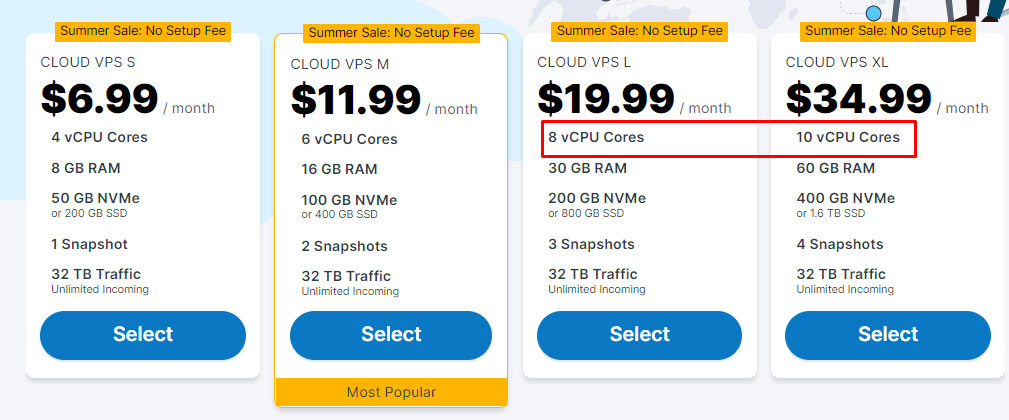
Contabo is known for its high-spec CPU servers. Their price is also affordable. If you’re looking for a CPU with 8 cores or more, you can go with Cloud VPS 8 or a larger plan. They use standard hardware of Intel, AMD, and Samsung. As the company has been in the industry for more than 20 years, they have premium hardware. For AMD, you will get EPYC 7282 16-Core Processor.
In the same way, Intel servers come with Xeon(R) CPU E5-2630 v4 @ 2.20GHz.
This will also allow you to optimize your cloud better. They have DevOps features with cloud-init and SSH. You will get the interactive panel for managing our cloud. Contabo uses German-quality hardware.
They use KVM and Proxmox for virtualization. You can customize the server as per your need. If you’re looking for a managed server, you can add their “managed” addon. In the same way, they provide SSD and NVMe storage as well. You can select the storage type as per your need.
The server is fully scalable. You can add the resources as you go. They also have another plan with 10 virtual cores. Each plan will give you unmetered incoming bandwidth. Once you order the service, you will get the server within a couple of seconds. The support isn’t quite the best. If you’re a beginner, you will have to rely mostly on the community.
The panel makes it easier for you to add resources or scripts.
Starting price: $13.44 per month for Cloud VPS 8 (8 vCPU cores, 24 GB RAM) for the first 24 months, then $16.80 per month.
Specs of Contabo
- CPU: 8 to 18 vCPU cores
- RAM: 24 to 96 GB
- Storage: 300 to 600 GB SSD (more storage available)
- Bandwidth/uplink/port speed: 600 Mbit/s to 1 Gbit/s
2. InterServer
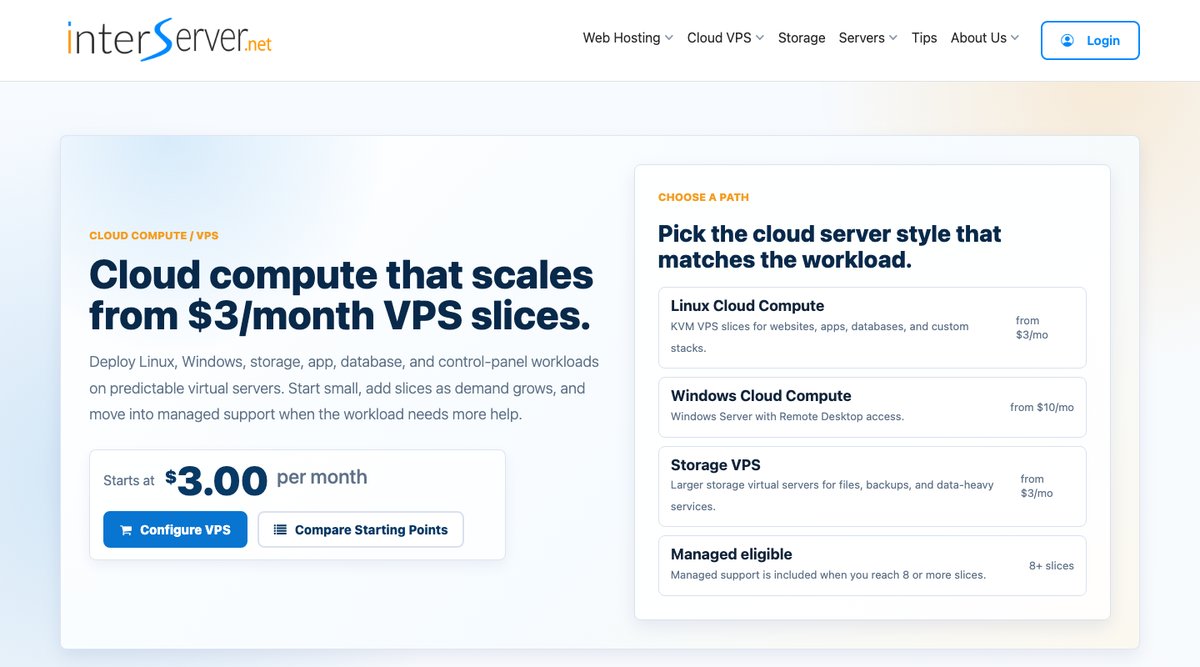
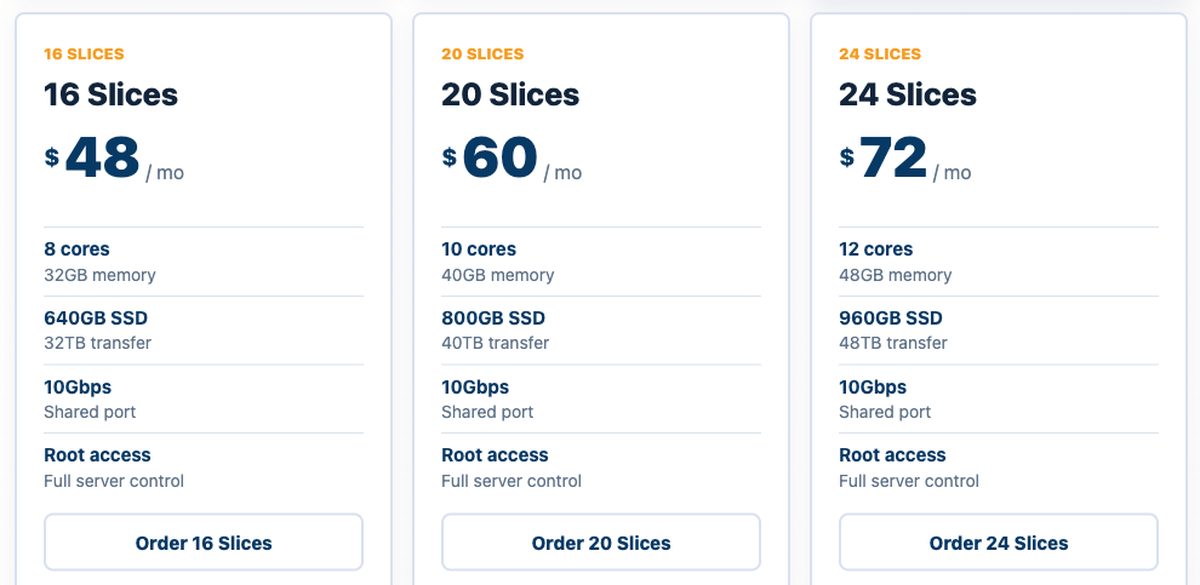
InterServer builds its cloud VPS out of slices. Each slice adds a fixed amount of CPU, memory, SSD storage, and transfer, so you pick the size you need instead of choosing from a short list of fixed plans. To get 8 cores, you need 16 slices.
The 16-slice VPS costs $48 per month and comes with 8 cores, 32 GB of RAM, 640 GB of SSD storage, and 32 TB of monthly transfer. That's a lot of memory for the price. Most 8-core plans on this list stop at 16 or 24 GB, so InterServer is a good fit for databases, several WordPress sites, or apps that need RAM as much as CPU. InterServer doesn't describe the cores as dedicated, so treat them as shared vCPU.
The bigger surprise is support. Managed support is included from 8 slices, so at 16 slices InterServer's engineers will help with failed services, databases, control panels, and common performance problems. Most cheap 8-core VPS plans are fully self-managed.
Every VPS gets root access, a static IP address, and a 10 Gbps shared port. Linux servers run on KVM, and Windows Server runs on Hyper-V with Remote Desktop access. If you'd rather not work from the command line, InterServer can install DirectAdmin (from $3.75 per month), cPanel, or Plesk, or you can use Webuzo to deploy WordPress and other apps.
Scaling is simple. You can add slices later, all the way up to 32 slices with 16 cores and 64 GB of RAM for $96 per month. The main limit is location: servers are only available in New York, Dallas, and Los Angeles.
Starting price: $48 per month for 16 slices (8 cores), billed monthly.
Specs of InterServer
- CPU: 8 cores (16 slices), up to 16 cores at 32 slices
- RAM: 32 GB
- Storage: 640 GB SSD
- Bandwidth/uplink/port speed: 32 TB transfer, 10 Gbps shared port
3. AlphaVPS
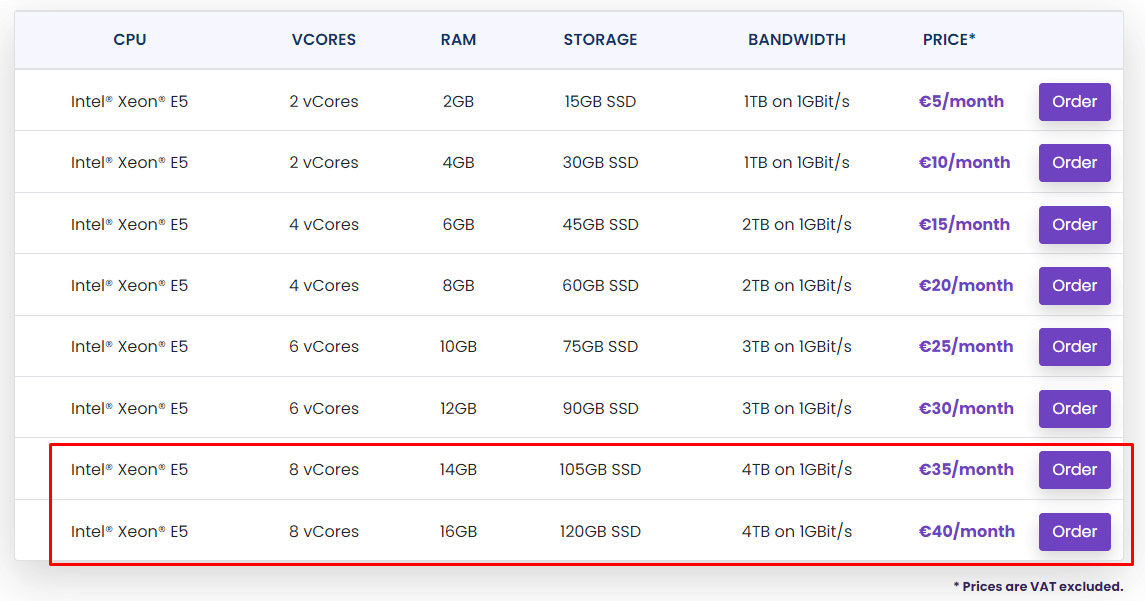
AlphaVPS provides multiple premium yet cheap 8-core VPS plans. The popular packages are of KVM with Intel Xeon servers. If you’re looking for AMD servers, they also have Ryzen VPS. For Intel, they have Intel® Xeon® E5 servers. On the other hand, the Ryzen VPS uses AMD Ryzen 9 CPUs with DDR5 ECC memory.
The company uses standard hardware to provide you reliable experience. They use Dell, HP, as well as SuperMicro hardware.
The servers are Docker and K8 ready. Not to mention, you can also install other apps if needed. You will get full root access to the server. The uptime is also great. They guarantee 99.9% uptime. You will get the interactive control panel to manage your server. They have 3 data centers in Europe and 2 in the US with reliable infrastructure. It’s a low-latency network that increases the speed of your server as well.
They have been in the industry for more than 8 years and are known for the cheap price with amazing support.
The configuration is very limited. You can’t add individual resources. If you want to upgrade, you will have to go with a new plan. However, their upside is very limited. In simple words, the maximum resources they can grant you are very limited. The same goes for the number of cores. The maximum cores you can get is 8. The cores are shared.
Therefore, you can host small to medium projects. It’s not recommended for large projects that might need more scaling.
Starting price: €20.39 per month for the Ryzen R8G plan (8 cores, 8 GB DDR5 RAM, 120 GB NVMe), billed annually at €244.70. (The prices are excluding VAT).
Specs of AlphaVPS
- CPU: 8 cores (AMD Ryzen 9)
- RAM: 8 to 16 GB DDR5 ECC
- Storage: 120 to 240 GB NVMe
- Bandwidth/uplink/port speed: 8 to 16 TB transfer, up to 10 Gbps port
4. Namecheap
When you want cheap and premium hosting services, Namecheap is the best platform you can probably go with. It’s great if you are just getting started and want to scale up as you go. The plan comes with limited resources. You can add more resources for a small price. They provide complete flexibility in adding resources.
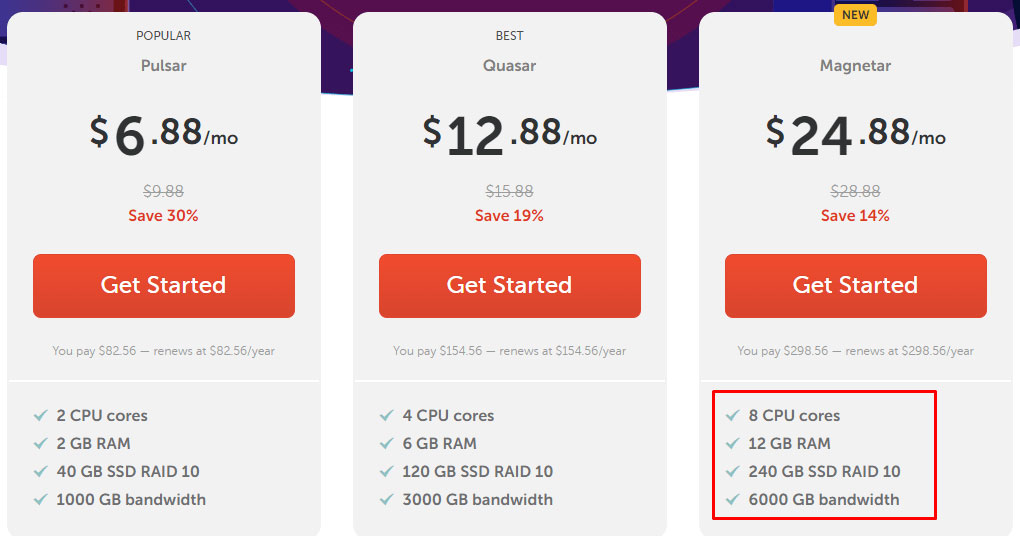
To begin with, you will get 240 GB SSD, you can add more if required. You can add as low as 10 extra GB for a small fee.
Namecheap ensures that you are getting the best quality of their resources. You will get RAID 10 storage and powerful servers. They also provide management services as an add-on. So, if you don’t want to do all the technical work, you can convert your self-managed VPS to managed one. The cost is cheap.
To ensure the best performance, they even have a 99.9% uptime guarantee for the VPS. If you’re still looking for more, they have a 30-day money-back guarantee. You don’t need any contract to get started. If you already have hosted your website somewhere, Namecheap will transfer your website for free.
They follow top security standards including DDoS protection and SSL. You will get complete control over your server. You can choose your favorite operating system. The support is amazing. They usually reply within a few minutes. They also have live chat where you will get instant human answers.
With all these premium services and cheap rates, Namecheap is one of the best 8 core VPS hosting providers. They use KVM virtualization for keeping your resources isolated.
Starting price: $24.88 per month if you go with an annual plan, it’s $28.88 for 1-month if you go with monthly billing.
Specs of NameCheap
- CPU: 8 cores
- RAM: 12 to 15 GB
- Storage: 240 to 280 GB SSD RAID 10
- Bandwidth/uplink/port speed: 1 Gbps
5. Hetzner
You can always go with Hetzner if you want to go with Europe or a US-based server. They have a mix of AMD and Intel VPS. They focus more on AMD. These (AMD) processors are available for all three locations. However, the Intl processor isn’t available in the US. Now that you have an idea about the locations, we will jump to the CPU.
For AMD, you will get EPYC 2nd Gen and they have Intel® Xeon® Gold processor with NMVe storage. You can get the CPU up to 16 cores. If you want more cores, you can also go with their dedicated servers. Hetzner is a cloud hosting provider. Cloud will give you more flexibility in scaling up the server. Here, you will get two types of cloud servers.
You can either go with the standard server with a shared CPU or you get a dedicated CPU. Not to mention, you can easily scale here.
Hetzner provides standard DDoS protection. You will also get access to all the features via API. To manage large workloads, you will get a load balancer to help you out. Further, they also allow you to assign a primary IP to your server. You can also use the floating IPs. The server is deployed in seconds.
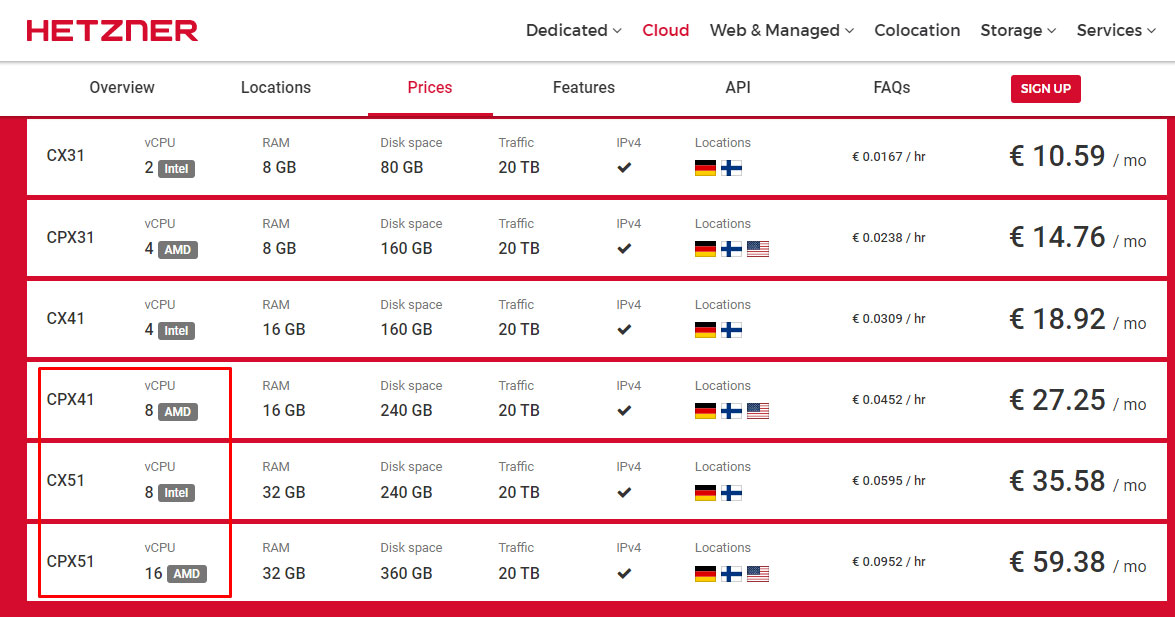
Starting price: €27.25 ($27.75) per month for a standard CPU.
Specs of Hetzner
- CPU: 8 to 16 cores (AMD EPYC 2nd Gen or Intel Xeon Gold)
- RAM: 16 to 32 GB
- Storage: 240 to 360 GB
- Bandwidth/uplink/port speed: 10 Gbit
6. OVHCloud
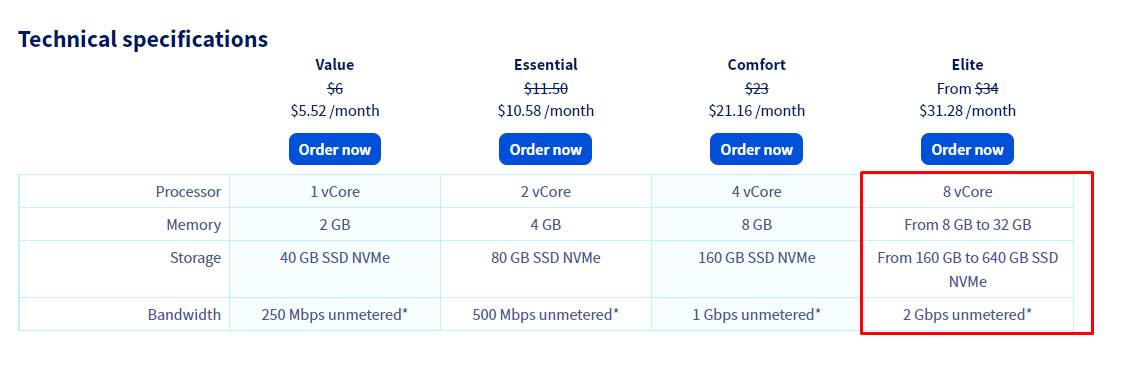
OVHCloud provides a 2 Gbps uplink speed for the 8-core VPS. Their VPS servers have various plans you can choose from. however, as we are looking for a cheap 8-core VPS, you will have to go with the Elite plan.
It’s highly recommended if you want to host a game server or a VPN service. The unmetered incoming and outgoing traffic is one of the reasons to go with OVH. Please note that the Asia Pacific region doesn’t have unlimited traffic. Even though the plan we are going with is their last plan on VPS, you will still get enough scalability. You will also get maximum resources.
The server comes with SSD NVMe to speed up the server. The availability of the server is also great. That’s why they provide 99.9% SLA uptime for the server. Not to mention, they provide a fully dedicated environment. So, no one else is using your resources.
You’re free to install any OS you want. You can also reboot your server whenever you want. they also have a rescue mode for the reboot.
When you’re working with high specs CPU, you will need to ensure safety as well. Here, you will get free DDoS protection along with automated backups. The automated backup is optional. There is an extra cost involved if you plan to use it.
Further, they use KVM for virtualization. OVH provides 2 4/7 monitoring and interventions to get the best level of safety. You can see your resource usage anytime you want.
Overall, OVH is pretty good for intensive apps. There are 8 data center locations. You can choose any of them when you order the server. There are several other options you can configure at the time of purchase such as storage, RAM, etc.
Starting price: The price starts at $31.28 per month.
Specs of OVHCloud
- CPU: 8 vCores
- RAM: 8 to 32 GB
- Storage: 160 to 640 GB SSD NVMe
- Bandwidth/uplink/port speed: 2 Gbps unmetered (public)
7. Hostinger

Hostinger is affordable hosting providing 100 Mb/s speed. The multi-core geek benchmark score shows that the performance is also awesome. They use Intel Xeon processors for speed. As the VPS uses an Intel processor, the price is slightly more as compared to others. You will get NVMe SSD for the storage. You will get dedicated resources.
The virtualization technology here is OVZ. The servers are optimized for better performance. Even the hardware they use is the latest. So, you can use the server at the maximum capacity.
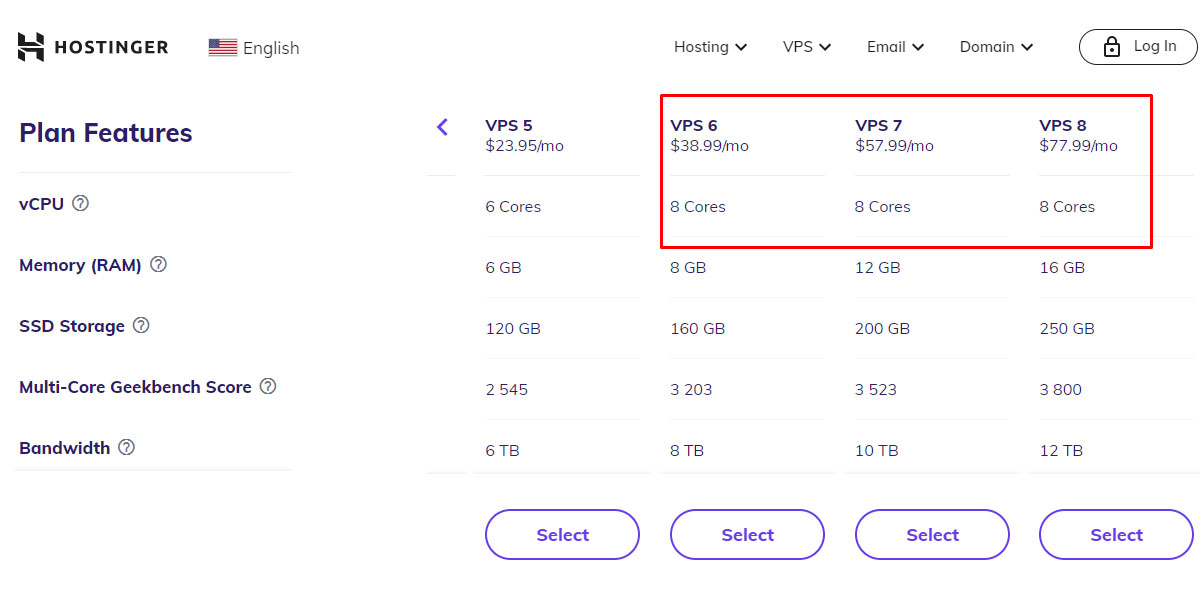
The scalability is limited. If you want to upgrade, you will have to choose a different plan. They don’t allow you to add the resources. On the positive side, they have three plans with 8-core CPUs. So, you can choose the best one depending on your need. So, if you’re planning to scale up as you go, you might want to consider another VPS in that case.
They do provide complete space flexibility. You can mount a remote NFS (Network File System) and use the storage space without any restrictions.
Talking about the features, you will get many developer-friendly features as well. They provide complete SSH access to the root server. If you are a non-technical person, they have an interactive web panel to manage your server. If you are still facing any issues, you can always contact their support which is available 24/7.
They utilize BitNinja’s full-stack protection to ensure the safety of your server. It also includes DDoS protection. You don’t even need to worry about the data as they have automated backups and manual snapshots features. You will get 99.9% uptime. Hostinger is known for its support and cheap rates. They are transparent about their VPS.
Starting price: $38.99 per month.
Specs of Hostinger
- CPU: 8 cores
- RAM: 8 to 16 GB
- Storage: 160 to 250 GB SSD
- Bandwidth/uplink/port speed: 100 Mb/s (Unrestricted)
8. Shinjiru
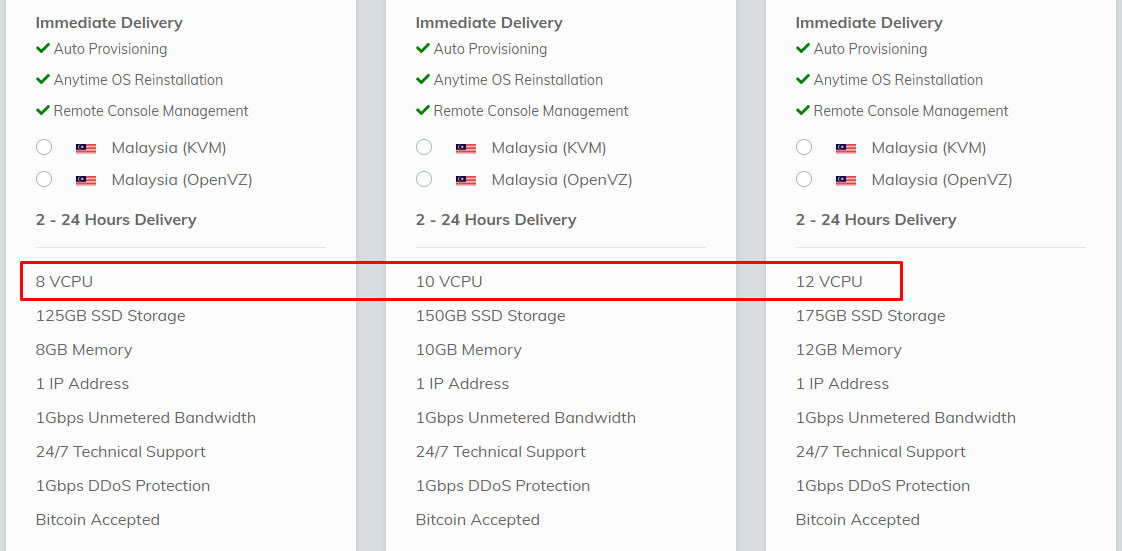
Shinjiru is a privacy-focused offshore hosting that has multiple VPS packages. You can get barebone VPS or you can also go with the virtualized VPS. You can choose from KVM and OpenVZ. They have servers for Windows and Linux. To get the 8-core VPS, you will have to choose the “Advanced” option and it will load the other plans. The advanced servers are only available for the Malaysia location.
They use Intel processors for the servers. You will get fast SSD technology for storage. Shinjiru allows you to add some addons for speeding up the server. For instance, you can add Litespeed tech and LS Cache. Further, they also have an addon for Cloudflare DNS. The hosting provider offers the best security to your server. By default, you will get 1 Gbps DDoS protection. You can add more if you want.
You will get full control like a single-tenant server. If you are planning to have a lot of visitors, you will love the unmetered bandwidth Shinjiru provides. They have auto-provisioning. So, you will get your server as soon as you place an order. While we are at the order part, you can also pay using Bitcoin. Coming back to the server, you can reinstall OS anytime you want.
Further, they have cheap managed troubleshooting services. The support is provided by Skype and ticket.
You will have to add this when you are ordering the server. Overall, you will get amazing security, specs, and performance of the server. So, you can surely go with Shinjiru.
Starting price: The price starts at $39.9 per month for a 24-month billing period and $40.90 per month for an annual period.
Specs of Shinjiru
- CPU: 8 to 12 vCores
- RAM: 8 to 12 GB
- Storage: 125 to 175 GB SSD
- Bandwidth/uplink/port speed: 1 Gbps
9. RackNerd
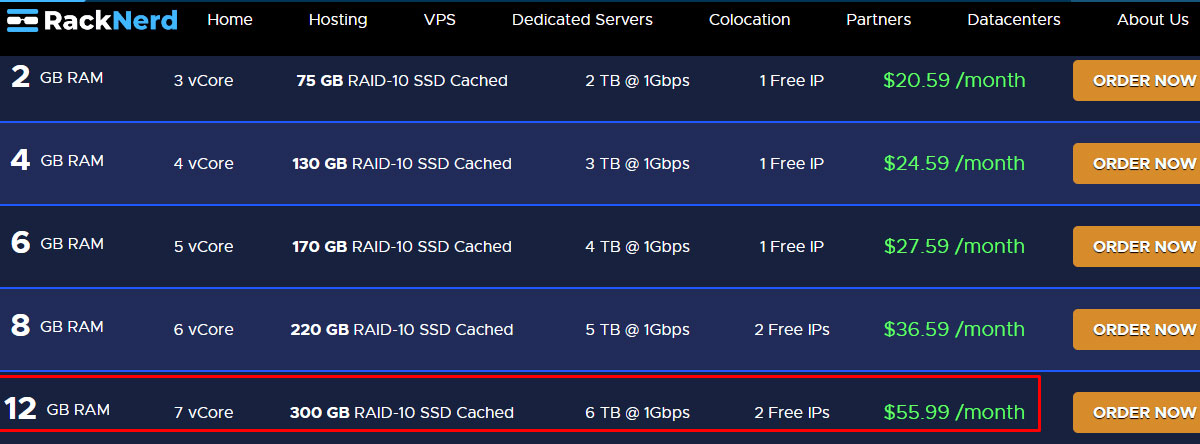
Racknerd is recommended if your script doesn’t need 8 cores to work. Yes, their best plan has 7 core processor. The reason why it’s on the list is because of the features and pricing. It’s an affordable hosting provider with a lot of features. You will get optimal performance here. They use KVM for virtualization. So, you will get dedicated resources.
They use Intel Xeon processors. So, you can rely on the server. You will also see AMD servers. However, they don’t have enough cores.
Coming back to Intel servers, you will get 2 free IPs with a 1 Gbps port. They use Noction IRP for better speed. The tagline “For nerds, by Nerds,” says a lot about the features they offer. It’s a developer-friendly VPS. They have multiple locations across the globe. You can choose any server you want. As the highest plan is of 7 cores, you will have limited upside scalability.
It’s great if you want to host a small project or MVP at a cheap rate. You can go with the monthly plan as well. They provide a SoluVM control panel to manage your server.
Further, you will have full control over your server. It includes reinstalling operating systems. The server is instantly provisioned. They have limited configuration available as you can only choose the OS and panel. Further, they have docker pre-installed with some Linux distribution.
To install other apps, you will have to do it manually. You have all the permissions to do the same. So, you can choose RackNerd if you want to host a small stable project.
Starting price: $47.14 per month when you pay annually. It’s $55.99 per month for monthly billing.
Specs of Racknerd
- CPU: 7 cores (Intel Xeon)
- RAM: 12 GB
- Storage: 300 GB SSD RAID 10
- Bandwidth/uplink/port speed: 1 Gbps
10. AlexHost Platinum VPS
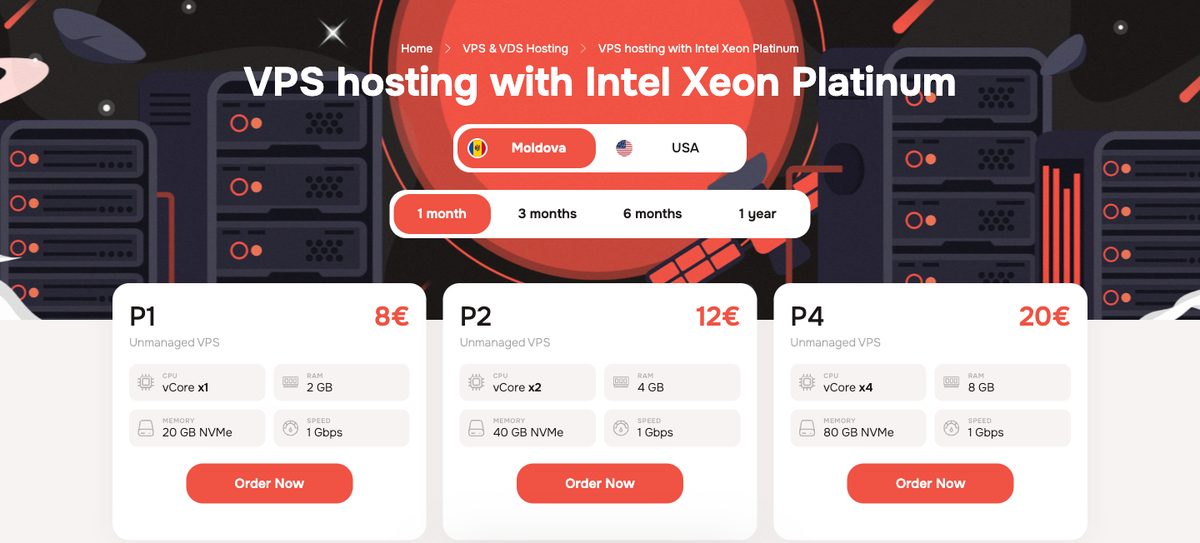
AlexHost's Platinum VPS line runs on Intel Xeon Platinum processors with ECC DDR4 memory and NVMe storage. It's the host's higher-end VPS range, and AlexHost says every plan gets guaranteed, isolated resources.
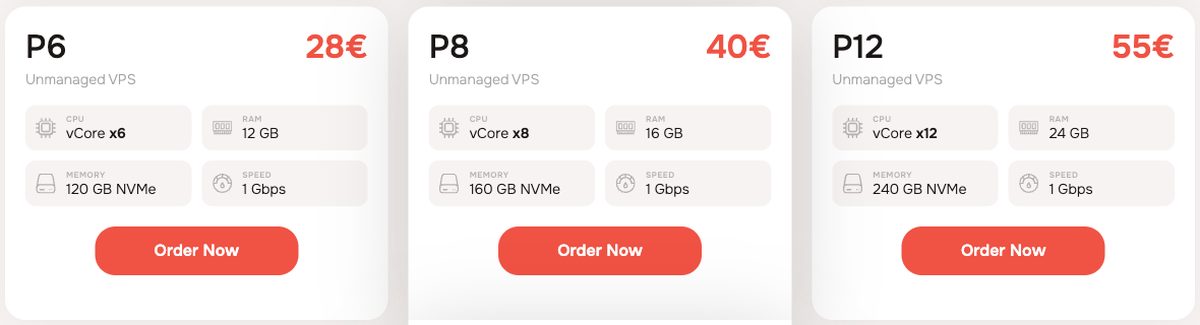
The 8-core plan is P8. It gives you 8 vCores, 16 GB of RAM, and 160 GB of NVMe storage for €40 per month. Paying for a year costs €408, which works out to €34 per month. If 8 cores isn't enough, P12 adds 12 vCores, 24 GB of RAM, and 240 GB of NVMe for €55 per month.
Every Platinum plan has a 1 Gbps port, and AlexHost lists the bandwidth as unlimited. That makes it a good option for traffic-heavy apps, game servers, or VPNs, as long as you stay within AlexHost's acceptable use policy.
You can deploy in Moldova or the USA (Las Vegas). The servers use KVM virtualization and include one IPv4 address. The plans are unmanaged, so you install and secure the operating system yourself. Backups, a control panel, and server administration are available as add-ons when you order.
Compared with the cheapest 8-core options here, P8 has less RAM than InterServer and costs more than Contabo. What you get in return is a Platinum-class CPU and unlimited bandwidth on a 1 Gbps port.
Starting price: €40 per month for P8 (8 vCores), or €408 per year (about €34 per month).
Specs of AlexHost Platinum VPS
- CPU: 8 to 12 vCores (Intel Xeon Platinum)
- RAM: 16 to 24 GB
- Storage: 160 to 240 GB NVMe
- Bandwidth/uplink/port speed: 1 Gbps, unlimited bandwidth
11. Cherry Servers Cloud VDS
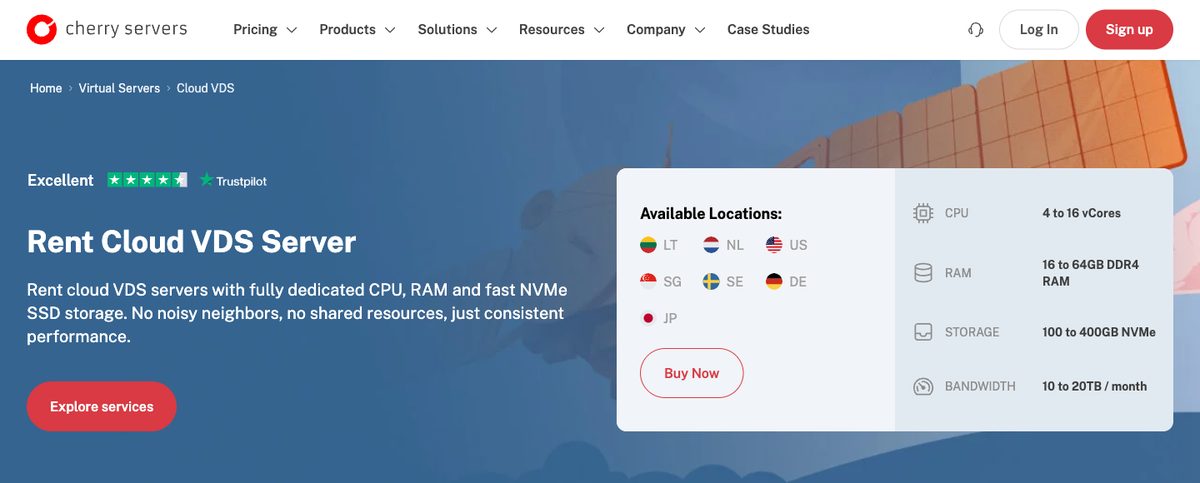
Cherry Servers is the only host on this list where the 8 cores are dedicated. Its Cloud VDS (virtual dedicated server) gives each server its own CPU, RAM, and NVMe storage, so other customers on the same hardware can't slow your VPS down.
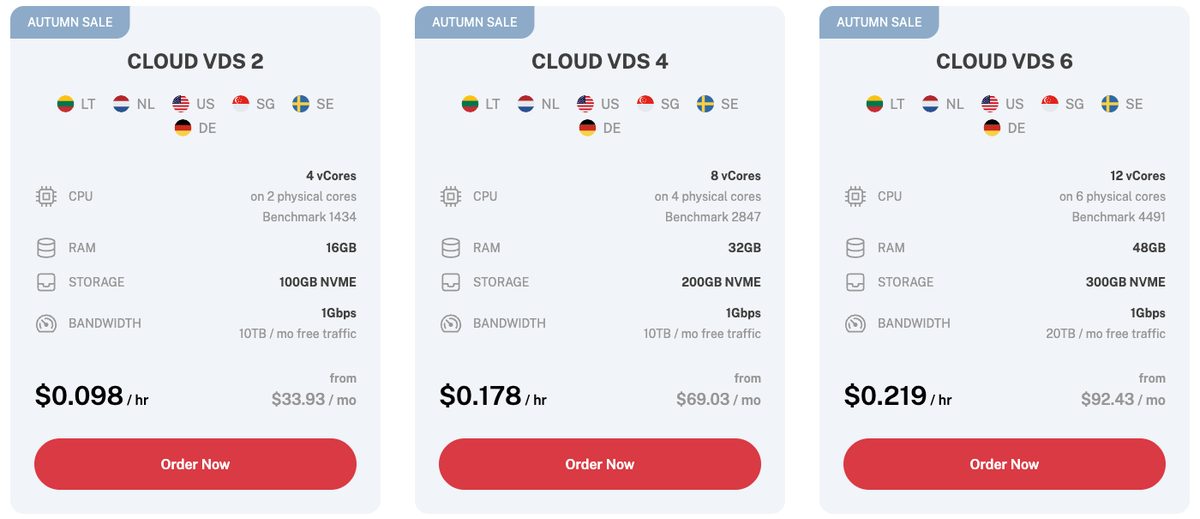
The 8-core plan is Cloud VDS 4. It has 8 vCores on 4 physical cores, 32 GB of RAM, 200 GB of NVMe storage, and a 1 Gbps port with 10 TB of free monthly traffic. Each pair of vCores comes from the same physical core. The servers run on Intel Gold 6230R or 6330 hardware.
Dedicated resources cost more. Cloud VDS 4 is $80.73 per month on monthly billing during Cherry's current autumn sale (normally $104.13), or $0.178 per hour. Longer fixed terms bring it down to $69.03 per month. That's more than double most shared-CPU plans here, but it's still cheaper than renting a dedicated server.
You can deploy in 6 locations: Lithuania, the Netherlands, the US, Singapore, Sweden, and Germany. Servers are usually ready in about 3 minutes, and you can manage them through the client portal, a CLI, or the REST API. Cherry Servers accepts more than 20 payment methods, including crypto and PayPal.
Pick Cherry Servers when you need steady CPU performance all day, such as databases, CI builds, or busy production apps. For bursty workloads, a cheaper shared-CPU VPS is usually enough.
Starting price: $80.73 per month for Cloud VDS 4 (autumn sale price, normally $104.13), or from $69.03 per month on a fixed term.
Specs of Cherry Servers Cloud VDS
- CPU: 8 dedicated vCores on 4 physical cores (Intel Gold 6230R/6330)
- RAM: 32 GB
- Storage: 200 GB NVMe
- Bandwidth/uplink/port speed: 1 Gbps, 10 TB free traffic
Buying guide for a high CPU VPS
We will now have a look at a guide on how you can select the best VPS.
CPU
Along with some cores, you will have to see whether you will get a shared CPU. Further, you can see the tread and speed. If your web app might have more traffic spikes, you can look for a burstable CPU or you can see if they provide a load balancer.
Hardware
You will have to check the hardware specs as well. The provider should use the latest hardware with the latest generations of CPUs. So, you can see if they use standard hardware.
Self-Managed vs Managed VPS
If you don’t have technical knowledge, you should always go with the managed VPS. In self-managed VPS, you will get the bare server. You can always add a panel to make your work easier. However, most of the script installation is done manually.
Scalability
As you’re already looking for a CPU with 8 cores, there are good chances that you will need to upgrade your server soon. So, you can also look for a higher number of cores. If your app is consuming too many resources, you might want to have to option to increase the number of cores.
Conclusion
VPS is great if your web app will use CPU in bursts. However, if you want to use 100% of your CPU, you should favor a dedicated server. For VPS, you should look for scalability as well. In some cases, you might want to increase the number of cores as you grow. So, in that case, you can look for the servers with more than 8 cores (or the servers that have the option to add more cores).
Here’s a quick selection of the CPUs.
- Best Price: Contabo
- Best CPU: Cherry Servers (dedicated cores)
- Best Specs overall: OVHCloud
FAQ
How much traffic can a VPS server handle?
VPS can easily handle more than 2000 visitors per day. However, it depends on the bandwidth, cores, processor, and many other factors.
Is VPS Better Than dedicated?
No, a dedicated server is better as compared to VPS. However, VPS is great if you want to get started at a cheap rate.